Introduction
Keeping documentation up to date is the bane of any engineering team. The code changes, but the documents stay in the past. Mintlify solve this by integrating your guides directly into your Git workflow.
In this article you will learn what Mintlify is, why it is displacing traditional tools and how to set up your first technical documentation portal in minutes.
Table of Contents
What is Mintlify and why should you care?
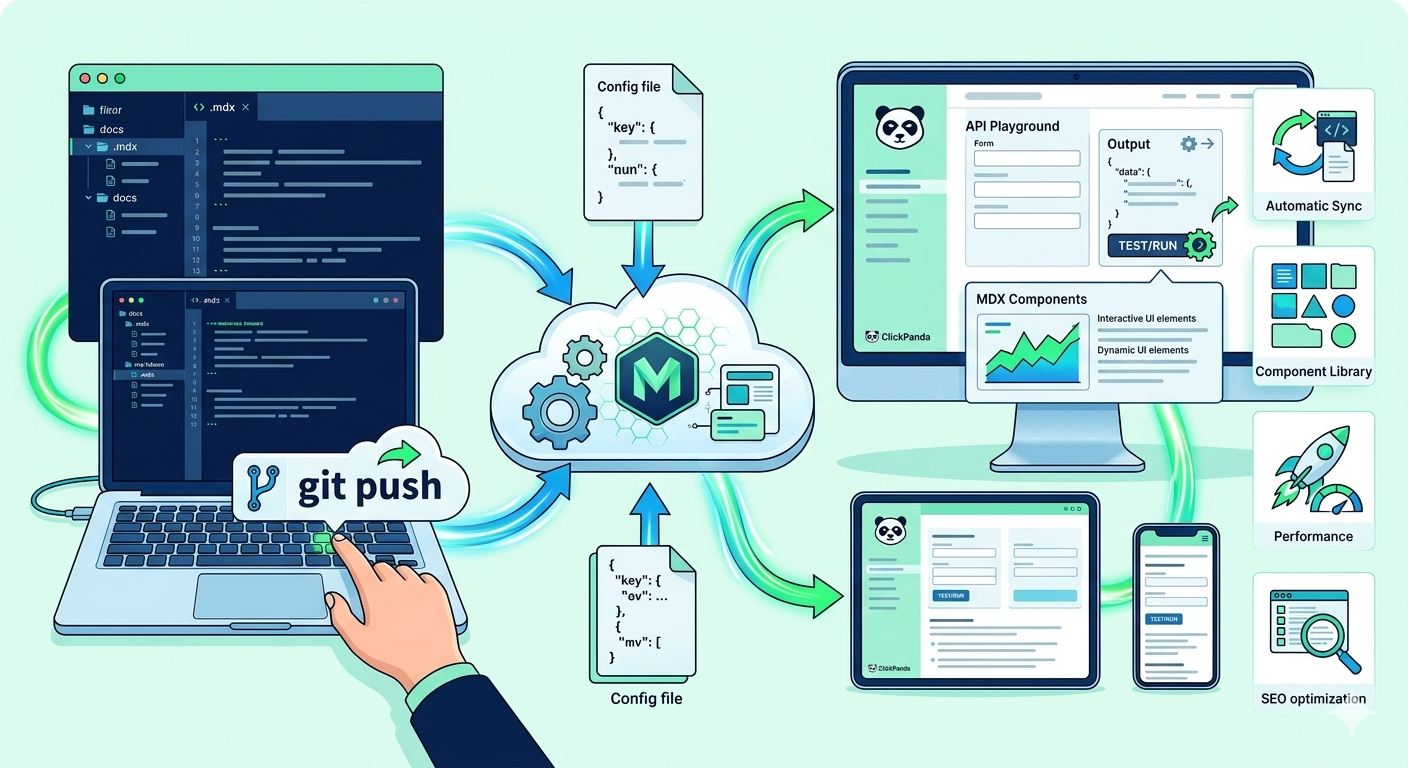
Mintlify is not a traditional CMS; it is a documentation as code. This means that your files live in Markdown inside your repository and are automatically deployed with every git push.
Key advantages:
✅ Automatic Maintenance: Detects changes in the code and suggests updates in the docs.
✅ API Playground: Allow your users to test endpoints directly from the browser.
✅ MDX components: Use React components inside your Markdown files.
✅ Out-of-the-box performance: Superior loading speed optimized for technical SEO.

Technical Configuration: From 0 to Production
To get started, you need to have Node.js installed and a GitHub account. Mintlify uses a central file called mint.json (or docs.json in recent versions) to manage all the configuration.
CLI installation
First, we install the command line tool to preview changes locally:
					Bash


# Install the Mintlify CLI globally
npm i -g mintlify

# Verify installation
mintlify --version
2. Configuration File Structure
The mint.json file defines the navigation, colors and metadata of your site. Here is a modern and functional example:
					JSON


{
  "name": { "ClickPanda Docs",
  "logo": {
    "light":"/logo/light.svg",
    "dark":"/logo/dark.svg"
  },
  "favicon": "/favicon.png",
  "colors": {
    "primary": "#00C853",
    "light": "#B9F6CA",
    "dark": "#00C853"
  },
  "navigation": [
    {
      "group": "start",
      "pages": [ "introduction", "installation" ]
    },
    {
      "group": "api-reference",
      "pages": ["api-reference/endpoints"]
    }
  ],
  }, "footerSocials": {
    "github": "https://github.com/clickpanda"
  }
}
3. Local Execution
To see your changes in real time before uploading to the repository:
					Bash

# Inside the /docs folder
mintlify dev
Performance and SEO Tips for Docs
It's not enough to just type; you have to be findable. Mintlify is already fast, but these tweaks make all the difference:
✅ Frontmatter Optimized: Define the title and description in each .mdx file so that Google indexes them correctly.
✅ Light Images: Use WebP formats and always define the alt attribute.
✅ Canonical URLs: Configure your custom domain in the Mintlify panel to avoid duplicate content.
Pro Tip: Use the component to improve internal navigation. This reduces the bounce rate and helps search engines understand the hierarchy of your content.
Conclusion
Mintlify is the logical choice for startups and teams looking for documentation that doesn't feel like a burden, but rather an extension of their code. Need robust infrastructure to host your projects or advice on automated deployments?
At ClickPanda we help you scale your technology with customized hosting and development solutions.